Brightness control tool for desktop monitors
Dimmer is a free utility program for PCs developed by Nelson Pires. It is a brightness control tool that can help users adjust and manage the brightness levels of their computer monitor through a simple and intuitive interface. It supports various screen types and is able to handle multiple connected displays at the same time.
Top Recommended Alternative
Quick brightness adjustments
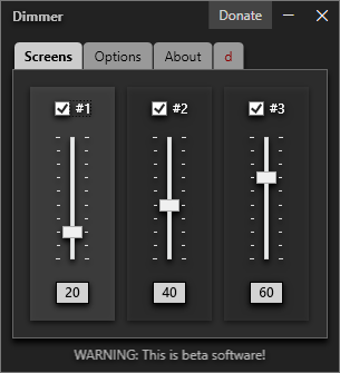
Getting started with the Dimmer app is pretty straightforward with its simple tabbed UI. The first tab shows all connected monitors to your PC, with corresponding adjustment sliders to increase or decrease their brightness as needed. You can also see the icons just below them to get a reading of what specific brightness level is currently set for your reference.
Jump to the options tab, and you can set different options like enabling auto run on boot, showing monitor names, and locking display brightness levels so they cannot be changed accidentally. One feature that the tool is lacking that could be added in the future is the option to set hotkeys for even faster navigation and adjustments on the fly.
Simple yet incredibly handy
If you're looking for a way to quickly adjust the brightness levels of your monitor/s, Dimmer is a simple yet handy utility tool that can help you out. It's very intuitive to use and supports multiple connected displays. It's also fast and lightweight, and is one of those programs that are a must-have on any PC.